

Generate a WATI API token, send the Bearer header, and select the permissions required by each endpoint.
Wati APIs use Bearer Token authentication. Every API request must include a valid API token in the HTTP Authorization header.
This guide explains how to generate your API token and include it in your API requests.
Please do not share the token with anyone, nor post it publicly.
Generate an API token
Before making API requests, you need to generate an API token from your Wati account.
Steps
-
Log in to your Wati account.
-
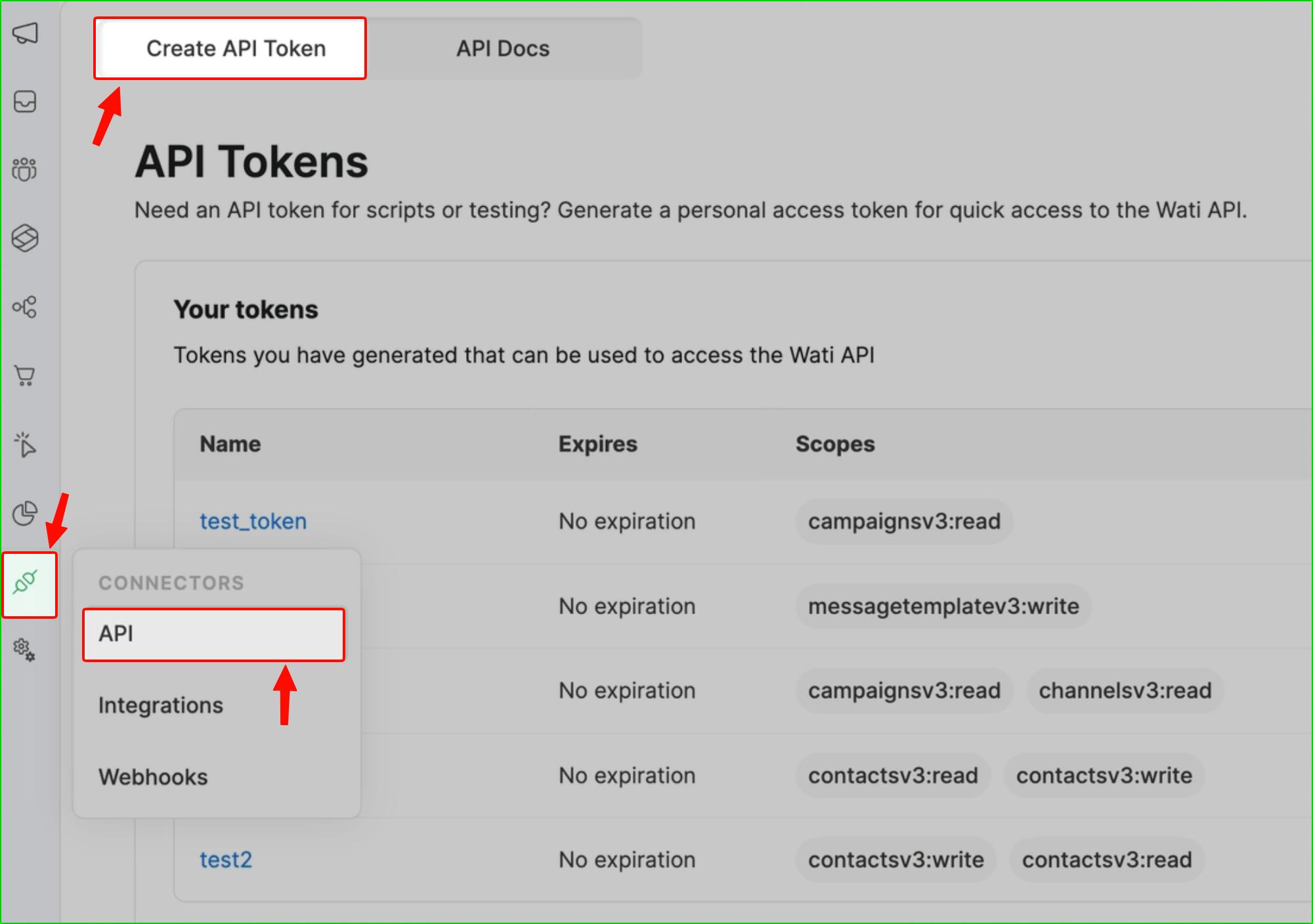
In the navigation menu, click API, or go to:
Connector → API → Create API Token
-
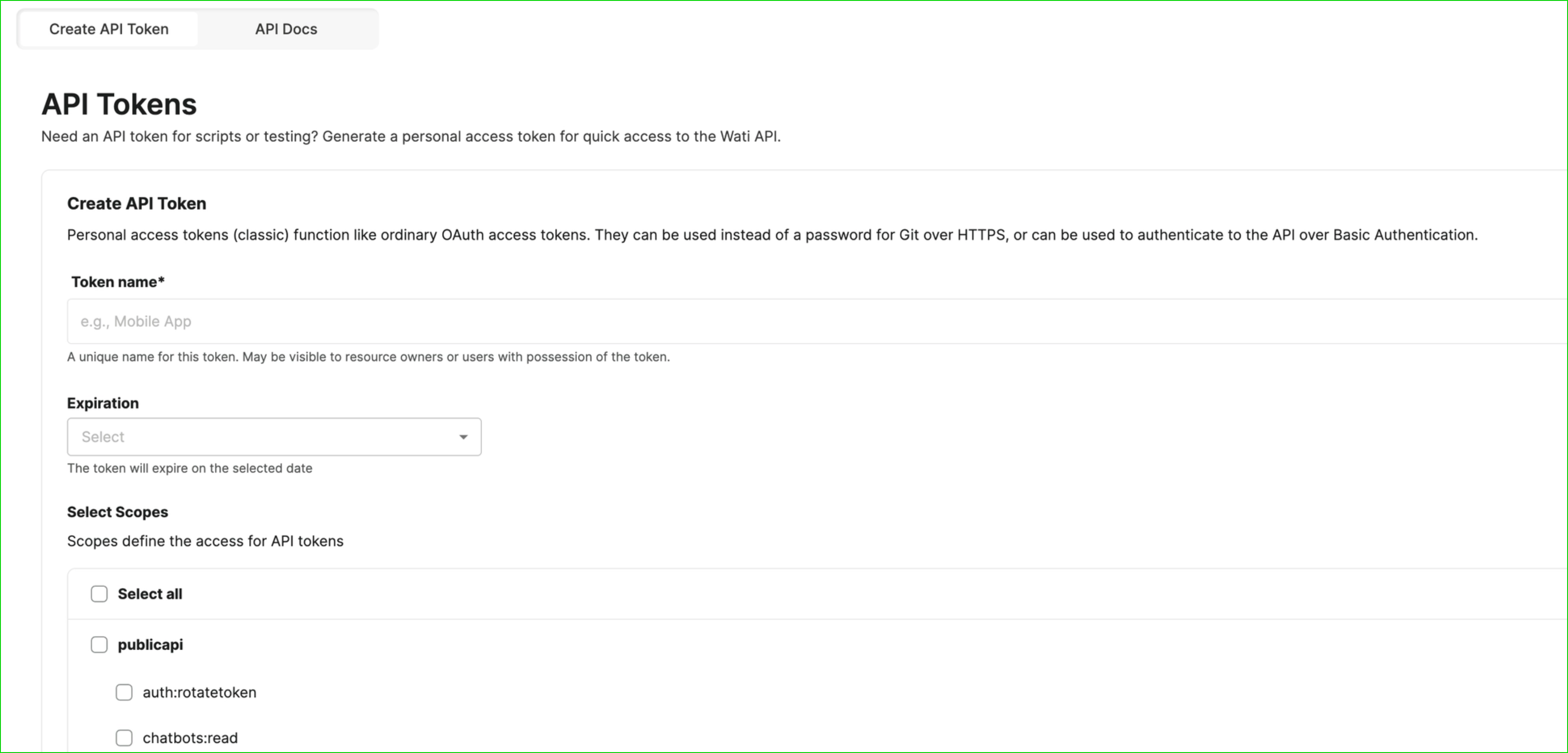
On the API Tokens page, click Generate new token.
-
Enter a token name and select the required scopes (permissions), such as:
contacts:readcontacts:writemessagetemplate:read
-
(Optional) Set an expiry date for the token. For security, rotating tokens every 6 months is recommended.
-
Copy and securely store the generated token.
The token will only be shown once. Make sure you save it securely.
Authentication header
All API requests must include the following HTTP headers.
| Header | Value |
|---|---|
Authorization | Bearer <your_api_token> |
Content-Type | application/json |
Example request
GET https://live-mt-server.wati.io/api/ext/v3/contacts?page_number=1&page_size=10

Authorization: Bearer <your_api_token>
Content-Type: application/jsonReplace
<your_api_token>with the token you generated in your Wati account.
Example API Call (cURL)
curl --location 'https://live-mt-server.wati.io/api/ext/v3/contacts?page_number=1&page_size=10' \
  --header "Authorization: Bearer ${WATI_API_TOKEN}" \
  --header 'Content-Type: application/json'
Using authentication in common tools
Postman
-
Open your API request.
-
Go to the Authorization tab.
-
Select Bearer Token as the type.
-
Paste your API token in the Token field.
-
Send the request.
Zapier, n8n, or any HTTP client
Add the following header to your request:
| Header Name | Value |
|---|---|
Authorization | Bearer <your_api_token> |
Using environment variables (recommended)
For security, store your API credentials as environment variables instead of hardcoding them in your source code.
Example:
WATI_API_ENDPOINT=https://live-mt-server.wati.io
WATI_API_TOKEN=<your_api_token>
Example usage:
Authorization: Bearer $WATI_API_TOKEN
Security best practices
Practice Description Rotate tokens regularly Regenerate API tokens every 6 months Use minimal scopes Only grant the permissions required for your integration Avoid exposing tokens Never commit tokens to Git repositories or public code Use environment variables Store tokens in environment variables or a secrets manager Separate environments Use different tokens for development, staging, and production
Troubleshooting
Issue Possible cause Solution 401 UnauthorizedToken missing, expired, or incorrect Generate a new token and ensure the Bearerprefix is includedNo Access Token providedMissing AuthorizationheaderAdd Authorization: Bearer <token>to the requestToken becomes invalid Account password was changed Generate a new token and update your integrations Request fails due to incorrect endpoint Wrong API base URL Use https://live-mt-server.wati.ioas the API host. Legacy V1/V2 requests must also include your{tenantId}immediately after the host; V3 requests must not.
Endpoint permissions
Each API endpoint includes a Permissions section. Choose the narrowest listed permission that supports your integration; possession of a valid token alone does not guarantee authorization.
- Permissions listed with OR are alternatives, not a requirement to grant every scope. For example, direct-send messaging accepts
apiORwati_integration:writeORconversations:write; payment-status and order-detail reads acceptapiORpayment:read. - The API-token authentication path evaluates the configured identity-provider scope hierarchy; OIDC checks its granted scope claims directly. Do not assume that every token type expands permissions identically.
- Some endpoints have no endpoint-specific scope attribute. Their Permissions section explains the conditional OIDC
apifallback rather than inventing a resource-specific scope. - Roles, workspace access, subscriptions, and other endpoint-specific checks remain applicable. A scope match is not a guarantee that these other checks pass.
- A
403 Forbiddencan indicate insufficient permission or another authorization restriction. Check the endpoint's Permissions and Responses sections before broadening token access. An invalid or missing token is an authentication problem, normally reported as401.
The OpenAPI security scheme remains HTTP Bearer authentication. Resource permissions are documented in endpoint prose and x-wati-permissions; they are not OAuth scope arrays on a Bearer security scheme. In that metadata, conditional: true means the listed scope may be required depending on account configuration; satisfying a scope does not guarantee access.